
Mobile access matters when you want to browse games, check promotions or manage an account without being tied to a desktop. Leon combines a responsive browser site with an Android APK, while iPhone and iPad users are generally directed to the mobile website. Before choosing a route, it is sensible to confirm current device support, payment availability and account requirements. The leon casino online login page may provide useful account information, but the exact features available to an individual player should always be confirmed after signing in.

Why the mobile website is the safest starting point
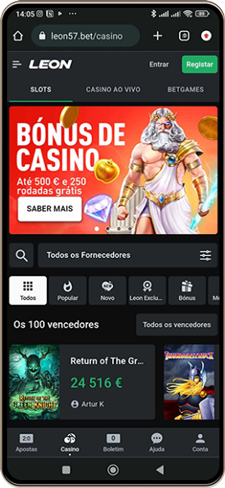
The responsive mobile website is the most consistent way to access Leon from a smartphone or tablet. It is designed to adapt to smaller screens, so players can browse the casino, open live casino content, review promotions and reach account settings through a normal browser. This avoids committing to a particular operating system or installing separate software before checking whether the service suits your device.
Using a browser can also make it easier to compare the layout with the desktop version. The game lobby can be explored by category or provider, while individual titles contain their own rules and settlement information. The catalogue includes pokies, table games, video poker, scratch or instant-win products, jackpots and live-dealer formats. Availability and performance can vary by device, browser and connection, so a short browsing session is useful before making any payment decision.
The browser route is particularly relevant for Apple users because Leon’s English help material says its iOS app is unavailable for technical reasons. Some country-specific help pages describe different iOS arrangements, meaning access should be treated as market-dependent rather than assumed. For an Australian player, the mobile website remains the dependable option unless the account or current operator information states otherwise.
Android access and the APK decision
Android users may have two mobile choices: the responsive website or a dedicated Leon APK downloaded from the operator’s website. An APK is an Android installation file, rather than an application delivered through the standard Play Store process. That distinction matters because the installation experience, permissions and update process can differ from familiar app downloads.
Installing an APK can require permission to install apps from unknown sources. Android displays this warning because the file comes from outside the Play Store flow, not because the file is automatically unsafe or unsafe by definition. Before proceeding, confirm that the download comes from the operator’s official website, review the address carefully and avoid copies shared through unofficial forums, advertisements or messaging groups.
There is no need to install the APK simply to test mobile play. The browser version provides the consistent cross-platform route and can be used to inspect the game lobby, promotions, cashier and account controls first. If the APK is considered later, check its version, required permissions and update instructions. Do not assume that an Android installation guarantees identical performance, game availability or payment options on every handset.
Choosing games that suit a smaller screen
Mobile casino play is easier when the game type matches the screen and connection you have available. Pokies often provide straightforward touch controls, while table games may require more attention to menus, bet selectors and rules. Live casino tables can involve streaming video and interactive panels, so their quality depends more heavily on connection stability and device performance than a simple, static interface.
Leon’s catalogue includes software from providers such as Pragmatic Play, Play’n GO, NetEnt, Evolution, Hacksaw Gaming, Yggdrasil, Push Gaming, Wazdan and others. Provider names can help narrow a search, but they do not replace checking the individual game information. Review the rules, stake options, paytable and settlement details before playing. A familiar title may still behave differently across formats or jurisdictions.
Do not treat a brief mobile session as proof of a game’s return or volatility. Those characteristics require broader statistical evidence and cannot be established reliably through a few spins or hands. If a result appears incorrect, record the game name, stake and exact time, then consult game history. Leon’s support guidance also asks for a screenshot where possible, while casino activity can be reviewed through My Account, Transaction History and Casino.
Payments, account checks and mobile security
The mobile cashier shows the practical payment choices available to a particular account. Currency, region and payment-system availability can affect what appears, so methods mentioned in general reviews should not be treated as guaranteed. Depending on the account and current configuration, documented options may include bank transfers, e-wallets, crypto wallets and other methods displayed in the cashier.
Transaction limits are shown for the selected method, and an external provider may charge a fee even when Leon does not apply its own standard transaction fee. Card withdrawals can take up to three working days according to Leon’s help material, while crypto and e-wallet delivery depends on the provider, account checks and blockchain conditions. A pending request may be cancellable from Transaction History, but cancellation is not available once processing has started.
Mobile convenience should not replace security checks. Leon allows two-factor authentication in account settings and also offers an optional six-digit PIN for additional protection during login, withdrawals and limit changes. Keep passwords private, avoid logging in over unsecured public networks and sign out on shared devices. Verification can be requested for every user, and further checks may arise when identity, payment ownership or transaction history needs clarification.
Managing play and support from a phone
A mobile casino account should be treated as a management tool, not just a games screen. Account settings can provide access to security controls, responsible gambling tools and session-related limits. Leon states that responsible gambling controls are available through Profile and Settings, with options for limiting playing sessions. These controls are worth reviewing before depositing, particularly when playing from a device that is always nearby.
Players can also ask Customer Service to restrict access to selected platform sections. Support operates 24/7 according to Leon’s help material and handles login issues, password recovery, verification questions, payment tracing, withdrawal status, casino disputes and technical problems. If a mobile game behaves unexpectedly, note the relevant transaction details rather than repeatedly attempting the same action.
Account recovery is available through the registered email address or mobile number if a password is forgotten. Leon also supports account-number login, so users can try a different permitted identifier before resetting credentials. A closed account cannot normally be restored through a simple password reset, making closure notices and support correspondence important. If gambling stops being enjoyable or controlled, use the available restrictions and seek independent assistance rather than chasing losses.
FAQ
Can I play Leon casino games without installing an app?
Yes. The responsive mobile website is the consistent option for smartphones and tablets, allowing access through a browser without a native installation. It can provide casino games, live casino, promotions, cashier functions and account settings, subject to the features and availability shown for your account.
Is an iPhone app available for Australian players?
Leon’s English help material says the iOS app is unavailable for technical reasons and directs iPhone and iPad users to the mobile website. Other country-specific pages may describe different arrangements, so Australian users should not assume an iOS app is available without checking current operator information.
What should I do if a mobile casino result looks wrong?
Check the casino transaction history and note the game name, stake and exact time of the round. Save a screenshot if possible, then contact Leon support with those details. Avoid making repeated wagers while investigating, as further activity can make the sequence harder to review accurately.